How to Use Nsauditor AI MCP Server with Claude Desktop for Network Security Auditing
Learn how to connect the Nsauditor AI MCP server to Claude Desktop and use natural language to perform professional network security audits, port scans, TLS checks, CVE lookups, and more.

Imagine asking your AI assistant, in plain English, to “scan my server for open ports, check its TLS configuration, and tell me if there are any known CVEs” — and having it execute all of that instantly, returning structured, actionable security findings. That’s exactly what the Nsauditor AI MCP Server enables when paired with Claude Desktop.
In this guide, we’ll walk through what Nsauditor AI is, how to install and configure it with Claude Desktop, and how you can use it for real-world network security auditing — all through natural language.
What Is the Model Context Protocol (MCP)?
The Model Context Protocol (MCP) is an open standard developed by Anthropic that allows AI models like Claude to connect to external tools, databases, and services. Instead of relying solely on training data, Claude can invoke MCP servers to perform real-time actions — running scans, querying APIs, reading files, and more.
Think of MCP servers as “skill packs” you plug into Claude. Once connected, Claude can autonomously decide which tools to call based on your instructions, chaining them together to complete complex tasks.
What Is Nsauditor AI?
Nsauditor AI is a powerful MCP server purpose-built for network security auditing. Built by NSASoft and available on npm, it exposes a rich suite of security scanning plugins directly to Claude (or any MCP-compatible AI client). With it, you can perform professional-grade network reconnaissance and vulnerability assessments without ever leaving your chat interface.
Available Security Plugins
Nsauditor AI ships with an impressive library of 26 built-in audit plugins, covering everything from basic connectivity checks to advanced TLS auditing and CVE lookups. Here’s a breakdown of the key capabilities:
🔍 Host Discovery & Port Scanning
- Ping Checker — Verify host reachability via ICMP
- Host Up Check — Determine if a host is online
- ARP Scanner — Discover live hosts on the local network
- Port Scanner — Detect open TCP/UDP ports
- TCP SYN Scanner (Nmap) — Stealthy SYN-based port scanning powered by Nmap
🔐 Service & Protocol Auditing
- SSH Scanner — Detect SSH version, ciphers, and key exchange algorithms
- FTP Banner Check — Grab FTP banners and identify software versions
- HTTP Probe — Inspect HTTP headers, redirects, and server info
- SNMP Scanner — Enumerate SNMP community strings and device info
- DB Scanner — Detect exposed databases (MySQL, MSSQL, PostgreSQL, Oracle, MongoDB)
- TLS Scanner — Enumerate supported TLS versions and cipher suites
- TLS Certificate & Cipher Auditor — Deep certificate validation and cipher strength analysis
🌐 Network Protocol Scanners
- DNS Security Auditor — Check for DNS misconfigurations and zone transfer vulnerabilities
- NetBIOS/SMB Scanner — Enumerate Windows shares and NetBIOS names
- MDNS Scanner — Discover mDNS-advertised services (Apple Bonjour, etc.)
- LLMNR Scanner — Detect LLMNR-enabled hosts (common MITM attack vector)
- Enhanced UPnP Scanner — Find UPnP-exposed devices and services
- SUN RPC Scanner — Enumerate RPC services and portmapper info
- DNS-SD Service Scanner — Discover DNS Service Discovery advertisements
- Enhanced WS-Discovery Scanner — Detect Web Services Discovery devices (printers, cameras)
🧠 Intelligence & Application Layer
- Webapp Detector — Fingerprint web applications, CMS platforms, and frameworks
- OS Detector — Identify the target operating system
- OpenSearch Scanner — Detect exposed OpenSearch/Elasticsearch instances
- TRIBE v2 Neural API Security Probe — AI-powered API security testing
- Result Concluder — Aggregates findings into a structured security summary
Installation
Nsauditor AI is distributed as an npm package and requires Node.js 18+. Install it globally with a single command:
npm install -g nsauditor-aiOr, if you prefer running it without a global install, you can use npx directly in your Claude Desktop configuration (recommended — it always fetches the latest version).
Configuring Claude Desktop
To connect Nsauditor AI to Claude Desktop, you need to edit the Claude Desktop configuration file. This file is located at:
- macOS:
~/Library/Application Support/Claude/claude_desktop_config.json - Windows:
%APPDATA%\Claude\claude_desktop_config.json
Add the following block inside the mcpServers object:
{
  "mcpServers": {
    "nsauditor-ai": {
      "command": "npx",
      "args": ["-y", "nsauditor-ai"]
    }
  }
}
Save the file and restart Claude Desktop. You should now see the Nsauditor AI tools listed in Claude’s tool panel.
Running Your First Security Scan
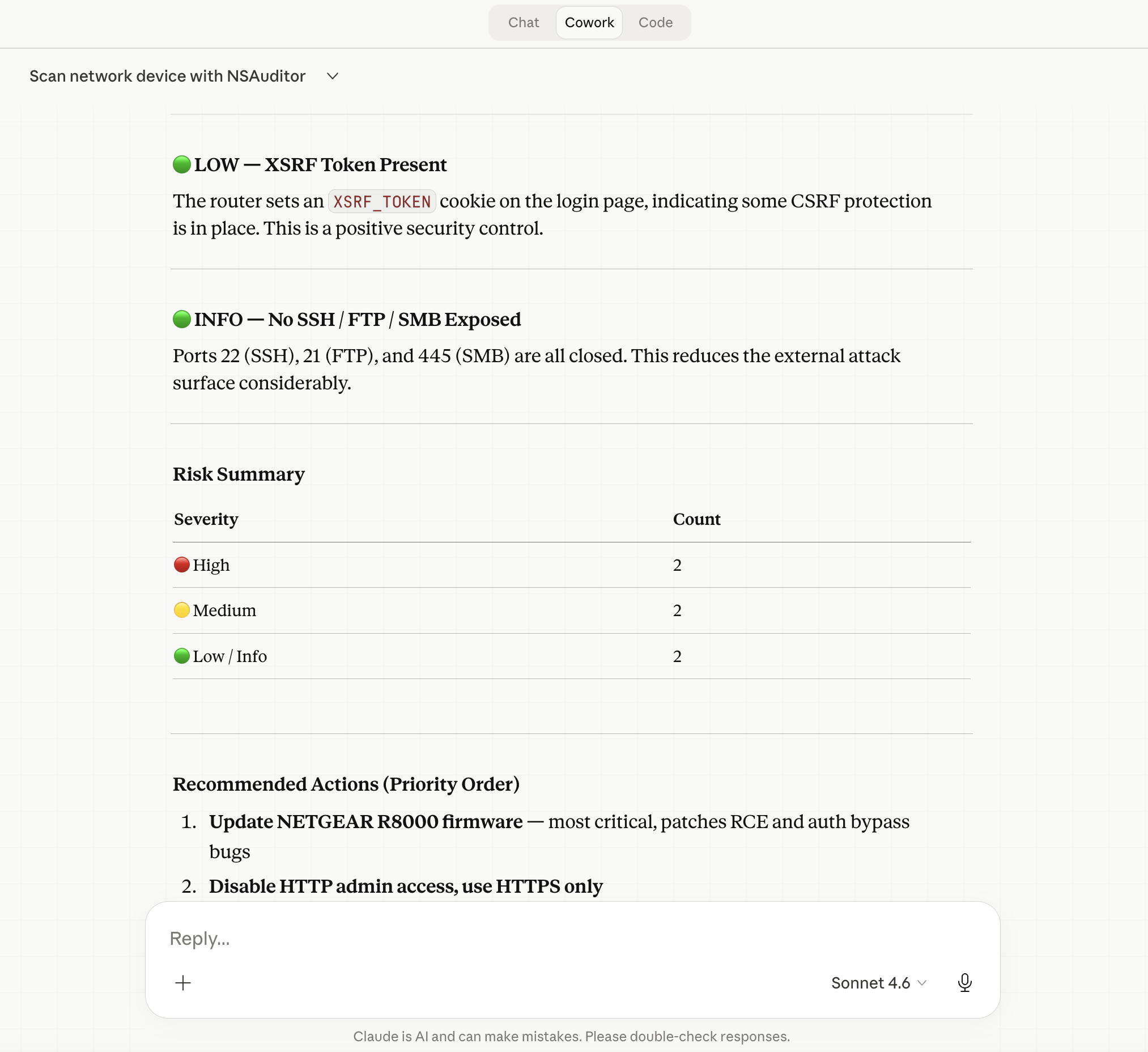
Once connected, simply describe what you want to do in plain English. Claude will determine the appropriate tools and execute them automatically. Here are some example prompts:
Full Host Scan
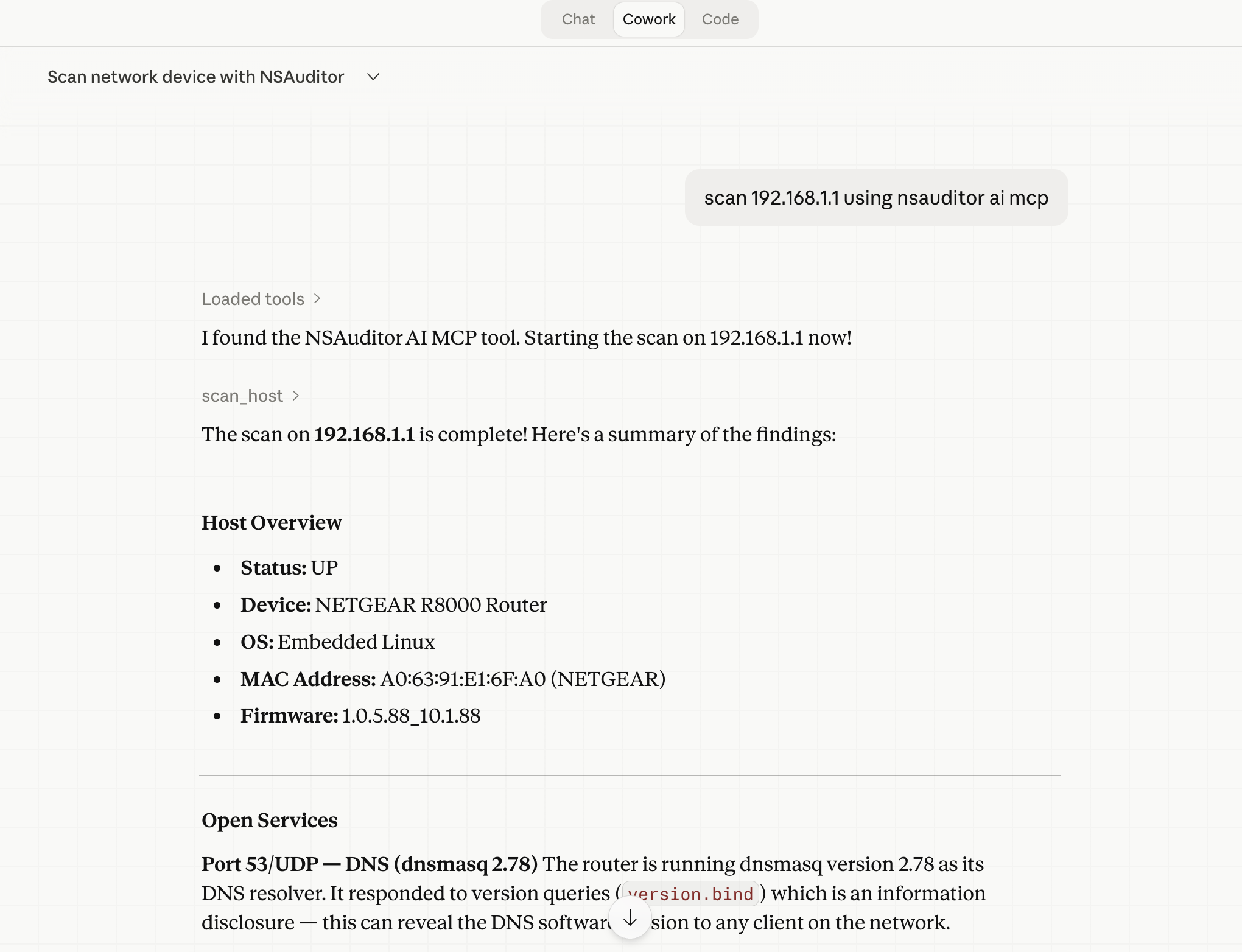
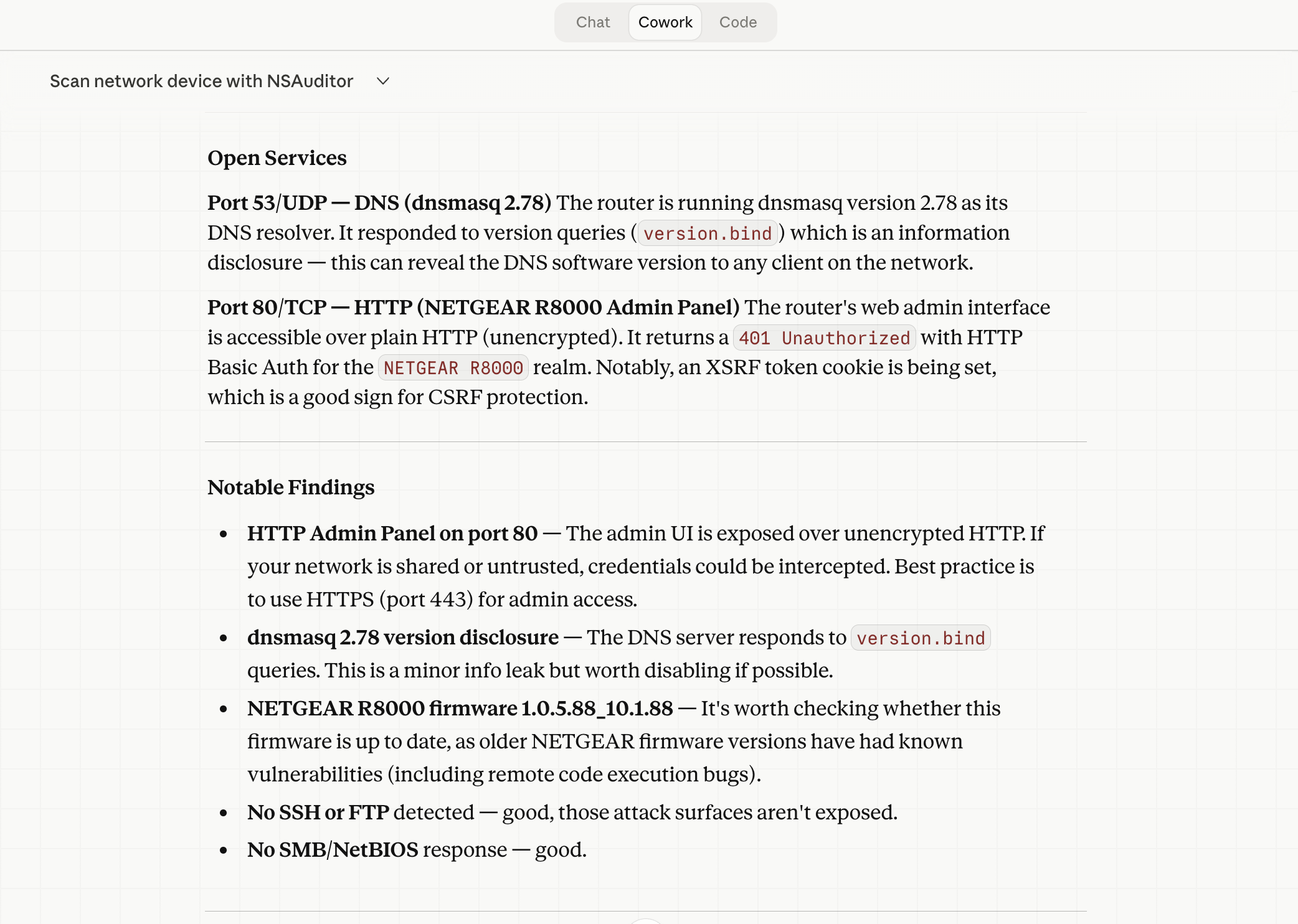
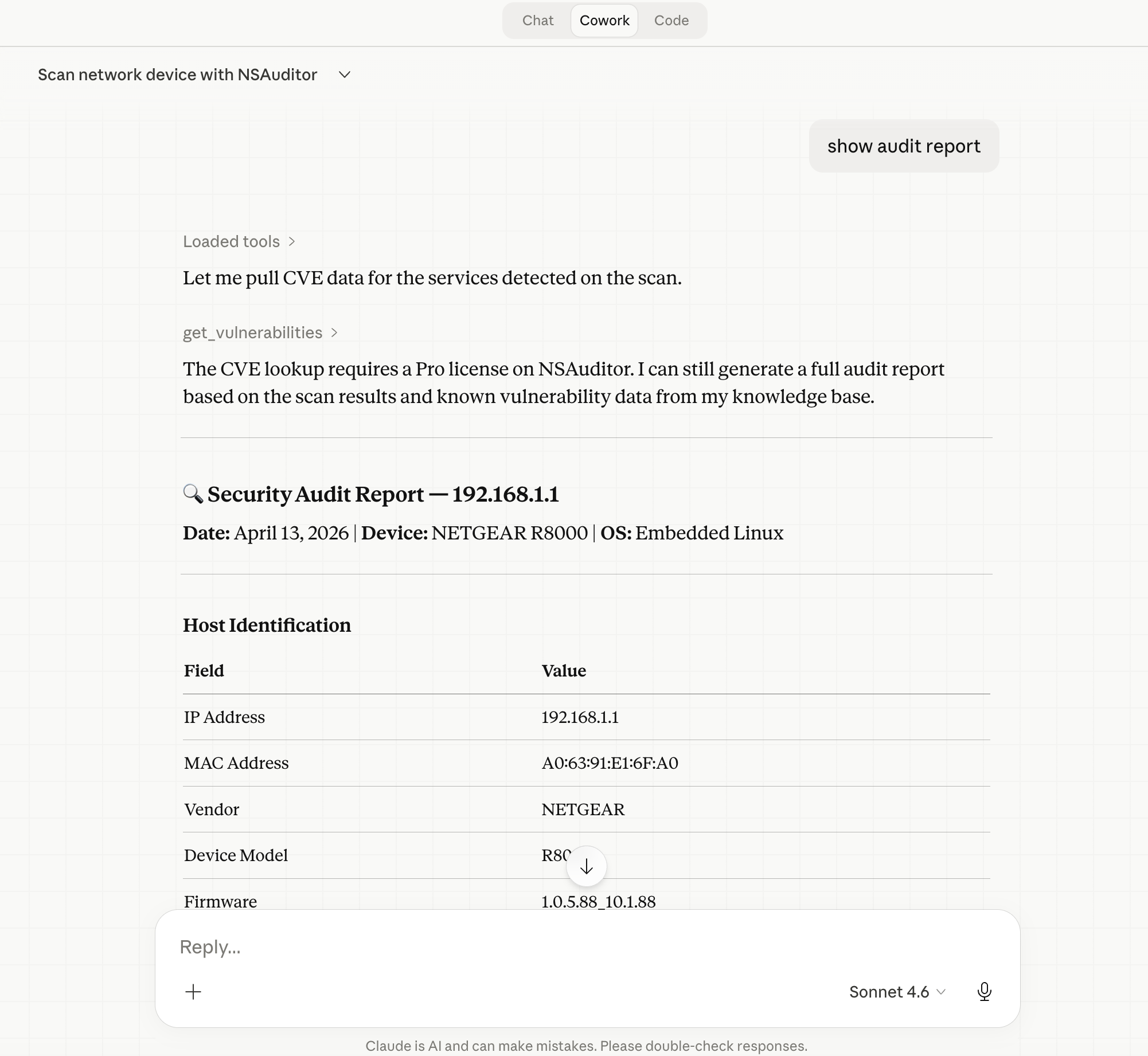
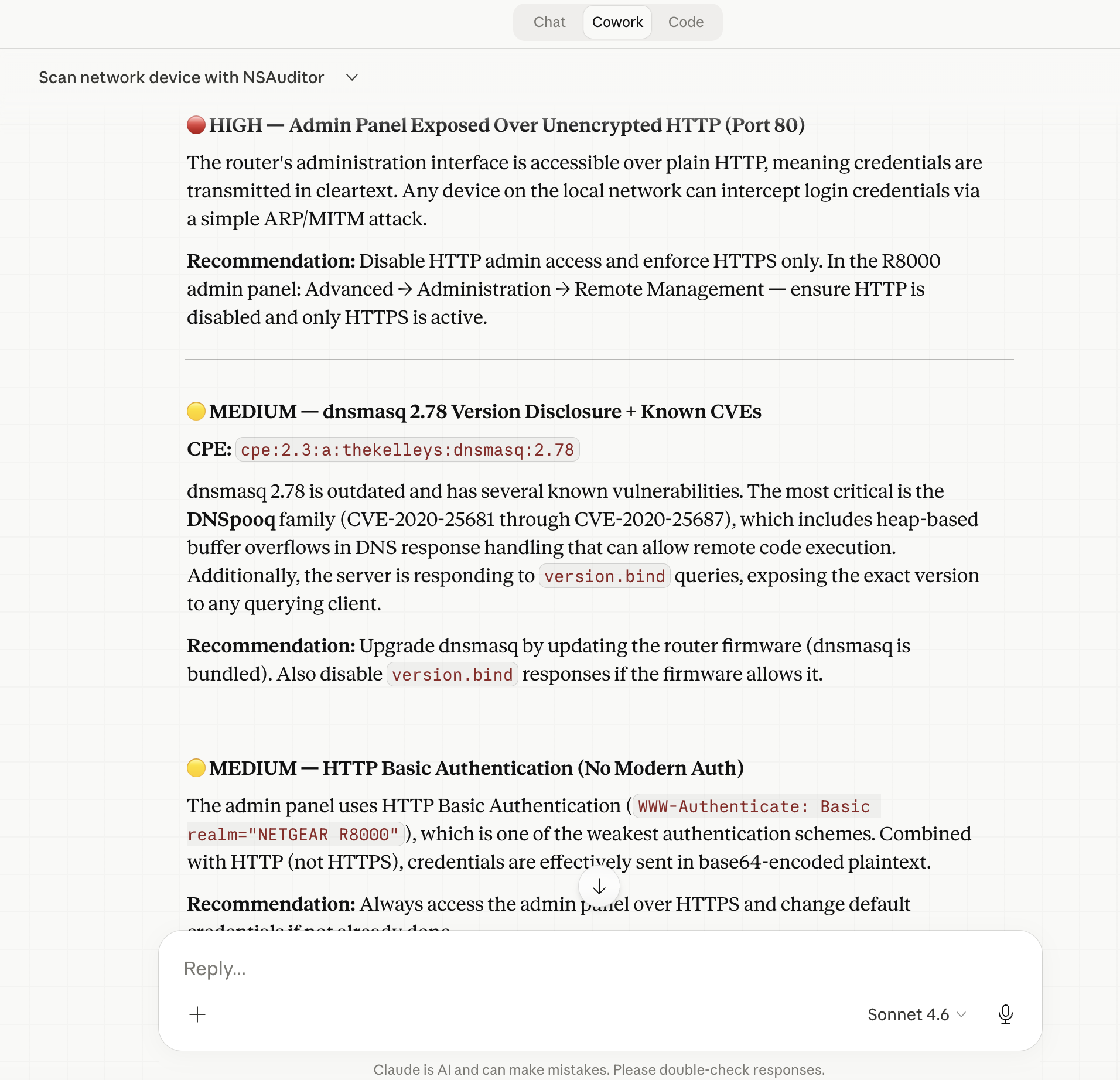
“Scan 192.168.1.1 and give me a full security report including open ports, services, OS, and any risks.”
Targeted Service Probe
“Check if the SSH service on myserver.com port 22 is using weak ciphers or outdated algorithms.”
TLS Certificate Audit
“Audit the TLS certificate and cipher suite on example.com and flag any issues.”
CVE Lookup
“Look up known vulnerabilities for Apache Log4j 2.14.1 and list the critical CVEs.”
Claude will invoke get_vulnerabilities with the appropriate CPE string and return a formatted list of CVEs with severity scores and descriptions from the NVD database.
The Four Core MCP Tools
At the API level, Nsauditor AI exposes four primary tools to Claude:
| Tool | Description |
|---|---|
list_plugins |
Lists all available audit plugins with their IDs, priorities, and requirements |
scan_host |
Runs a full multi-plugin security scan on a target hostname or IP |
probe_service |
Runs a specific plugin against a single host:port combination (Pro) |
get_vulnerabilities |
Looks up CVEs for a given CPE string using the NVD API (Pro) |
Community Edition vs. Pro
Nsauditor AI is available in two tiers:
- Community Edition (CE) — Free. Includes
list_pluginsandscan_hostfor full host scanning with all 26 plugins. - Pro Edition — Unlocks
probe_service(targeted single-service probing),get_vulnerabilities(NVD CVE lookups), risk summaries, and additional advanced features.
For most home labs, small business audits, and penetration testing assessments, the Community Edition provides a solid foundation. The Pro tier is ideal for security professionals who need targeted service probing and automated CVE correlation.
Real-World Use Cases
Security teams can use Nsauditor AI with Claude to rapidly triage new servers added to the network — asking Claude to “check all standard ports and flag anything unusual” without writing a single script.
Penetration testers can leverage it during reconnaissance phases, combining scan_host results with Claude’s analytical capabilities to prioritize attack vectors and generate draft findings reports.
System administrators can set up scheduled audits by asking Claude to scan infrastructure on a regular basis and summarize changes, catching newly exposed services or deprecated cipher suites before attackers do.
Developers can integrate it into CI/CD pipelines using Claude’s MCP API, running automated TLS and port checks against staging environments before production deployments.
Getting Started
Ready to supercharge Claude Desktop with network security superpowers? Here’s your quick-start checklist:
- Install Node.js 18+ if you haven’t already
- Run
npm install -g nsauditor-ai(or usenpxdirectly) - Edit your
claude_desktop_config.jsonto add thensauditor-aiMCP server entry - Restart Claude Desktop
- Start scanning — just describe your target and goals in plain English
For full documentation, the latest changelog, and contribution guidelines, visit the official resources:
The era of conversational security auditing is here. With Nsauditor AI and Claude Desktop, you can go from zero to full network assessment in minutes — no CLI expertise required.